
HOME | ABOUT | BUY-NOW | HOW IT WORKS | INSTALL INFO | Q & A | CHANNELS | PRIVACY | CONTACT

GoMaxTv.com
GolMaxTv.com


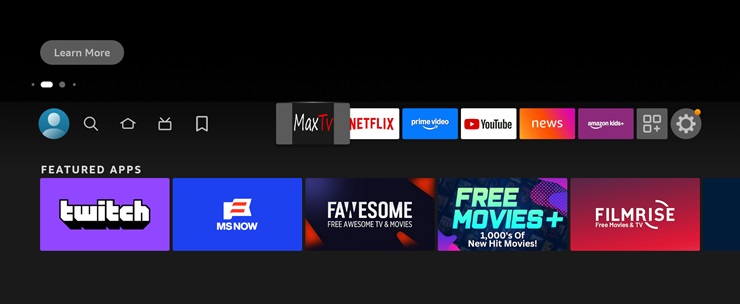
9. Installation is now complete. You can find you MaxTv41 app in your application list. To find click the home button on your firestick remote.
Then move to the right to the applications button , click to open applications folder. Then scroll down until you see the MaxTv app and move to highlight the MaxTv app as shown in picture below.

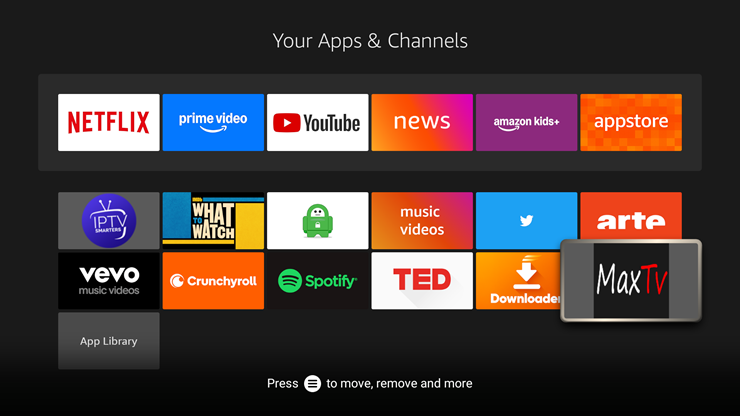
10. While you have the MaxTv app highlighted press the Menu Button.
Looks like 3 horizontal lines over one another. That will bring up a small menu on the right side of the screen. Scroll down to the "move to front" option and select it and press enter. This will move your app to the front of your apps for easy access.

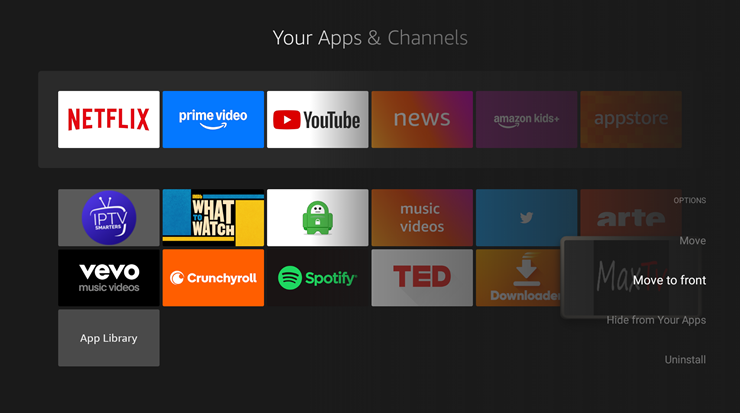
11. Now press the Home button and you should see the MaxTv app on the top line on your home screen.
HOME | ABOUT | BUY-NOW | HOW IT WORKS | INSTALL INFO | Q & A | CHANNELS | PRIVACY | CONTACT